Posts: 7
Threads: 5
Joined: Jan 2026
Reputation:
0
11-02-2026, 09:04 AM
(This post was last modified: 11-02-2026, 09:05 AM by Eritar.)
Hi, sorry to bother you again, I'm encountering a rather unreliable skinning behaviour.

Steps to reproduce:
When modifying the RubberDragon demo, if you increase the Surface and Volume Sampling to a 100, to increase the particle count. And re-binding it in the skinner with the default parameters. Removing custom skinmap doesn't help.
Increasing Radius in the Bind parameters helps the issue somewhat, but it "inflates" the skinned mesh, and is a workaround I'd like to avoid.
Thank you very much for your continuing support and development of this amazing plugin!
Posts: 6,755
Threads: 28
Joined: Jun 2017
Reputation:
439
Obi Owner:
11-02-2026, 09:37 AM
(This post was last modified: 11-02-2026, 09:40 AM by josemendez.)
(11-02-2026, 09:04 AM)Eritar Wrote: Hi, sorry to bother you again, I'm encountering a rather unreliable skinning behaviour.
Steps to reproduce:
When modifying the RubberDragon demo, if you increase the Surface and Volume Sampling to a 100, to increase the particle count. And re-binding it in the skinner with the default parameters.
Hi!
The default skinning parameters may not work in all cases. You may need to increase the radius (which is a simple euclidean distance between vertices and particles) so that it considers more particles when calculating skinning.
Vertices that are not skinned to any particle will remain at (0,0,0), which is what is shown in your screenshot.
(11-02-2026, 09:04 AM)Eritar Wrote: Removing custom skinmap doesn't help.
Removing the skinmap will entirely break skinning, so it won't help at all.
(11-02-2026, 09:04 AM)Eritar Wrote: Increasing Radius in the Bind parameters helps the issue somewhat, but it "inflates" the skinned mesh, and is a workaround I'd like to avoid.
Increasing bind radius should not inflate the mesh at all, it only affects how many particles are considered when calculating skin weights: larger radius = more particles considered. Would it be possible for you to share a screenshot of how this "inflation" looks?
kind regards,
Posts: 6,755
Threads: 28
Joined: Jun 2017
Reputation:
439
Obi Owner:
Hi!
Upon testing, could reproduce the issue in 7.0 and 7.1. Will get back to you with a solution soon.
kind regards,
Posts: 6,755
Threads: 28
Joined: Jun 2017
Reputation:
439
Obi Owner:
11-02-2026, 10:05 AM
(This post was last modified: 11-02-2026, 10:05 AM by josemendez.)
Thanks for reporting this issue!
Found the culprit: skin, blueprints and softbody transforms have different scales, and there's a bug that affects the skinning process, shifting particle distances by an incorrect scale.
To fix it, open up ObiSoftbodySkinner.cs, around line 331 you should find this:
Code: var blueprintTransform = Matrix4x4.TRS(Vector3.zero, softbody.softbodyBlueprint.rotation, softbody.softbodyBlueprint.scale);
skinMap.MapParticlesToVertices(skinnedMeshRenderer.sharedMesh, softbody, transform.localToWorldMatrix * blueprintTransform, softbody.transform.worldToLocalMatrix, radius, falloff, maxInfluences, true, softbodyInfluence, m_softbodyInfluences);
Replace with:
Code: skinMap.MapParticlesToVertices(skinnedMeshRenderer.sharedMesh, softbody, transform.localToWorldMatrix, softbody.transform.worldToLocalMatrix, radius, falloff, maxInfluences, true, softbodyInfluence, m_softbodyInfluences);
The reasoning for this is that blueprint scale/rotation is already baked into particle rest positions, no need to reapply it during skinning.
Let me know if this fixes your problem.
kind regards,
Posts: 7
Threads: 5
Joined: Jan 2026
Reputation:
0
Thank you very much, the fix indeed solved the issue even on default Bind settings!
To highjack the thread with a semi-related question, is this performance expected, or am I doing something wrong?
This looks like a bug at first glance, because in the profiler GPU is barely utilised, despite Solver being set to GPU compute. And it seems majority of the frame time is occupied by CPU waiting for GPU?
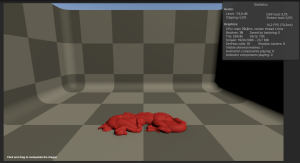
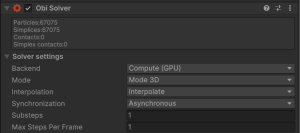
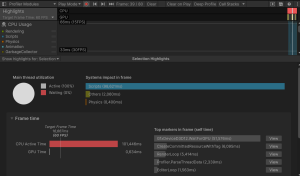
Specs: Ryzen 5900X, RTX 3090 if they matter.
Thank you very much!
Posts: 6,755
Threads: 28
Joined: Jun 2017
Reputation:
439
Obi Owner:
12-02-2026, 05:12 PM
(This post was last modified: 12-02-2026, 06:16 PM by josemendez.)
(12-02-2026, 04:54 PM)Eritar Wrote: Thank you very much, the fix indeed solved the issue even on default Bind settings!
To highjack the thread with a semi-related question, is this performance expected, or am I doing something wrong?
This looks like a bug at first glance, because in the profiler GPU is barely utilised, despite Solver being set to GPU compute. And it seems majority of the frame time is occupied by CPU waiting for GPU?
Specs: Ryzen 5900X, RTX 3090 if they matter.
Thank you very much!
Hi,
Yes, this is to be expected. +60000 shape matching constraints is *a lot* of work, and will be very intensive for the GPU since each individual cluster is mostly serial: each constraint has to iterate over all particles in the cluster, even if all constraints can be simulated in parallel.
Also keep in mind that the scene has self-collisions enabled, which for 60k particles will generate tends of thousands of contacts, further degrading performance.
Note that GPU utilization in the profiler seems to only take draw calls into account, not compute dispatch() calls.
I tried a similar setup (with particle collisions disabled, only shape-matching constraints) in a RTX4090 and I get around 150 fps, but it's a comparatively more powerful GPU.
kind regards,
Posts: 7
Threads: 5
Joined: Jan 2026
Reputation:
0
(12-02-2026, 05:12 PM)josemendez Wrote: Hi,
Yes, this is to be expected. +60000 shape matching constraints is *a lot* of work, and will be very intensive for the GPU since each individual cluster is mostly serial: each constraint has to iterate over all particles in the cluster, even if all constraints can be simulated in parallel.
Also keep in mind that the scene has self-collisions enabled, which for 60k particles will generate tends of thousands of contacts, further degrading performance.
Note that GPU utilization in the profiler seems to only take draw calls into account, not compute dispatch() calls.
I tried a similar setup (with particle collisions disabled, only shape-matching constraints) in a RTX4090 and I get around 150 fps, but it's a comparatively more powerful GPU.
kind regards,
Thanks a lot for clarification! Your product support is better than some enterprises have!
|






